
What is Strong Customer Authentication (SCA)?
Strong Customer Authentication (SCA) is a requirement introduced as part of the PSD2 regulation in Europe on September 14, 2019. This regulation requires additional verification steps for certain online payments made by European customers.
To comply with SCA requirements, card payments may require 3D Secure authentication. This additional security step requires cardholders to verify their identity with the card issuer before the payment can be completed.
During the 3D Secure process, customers may be redirected to an authentication page provided by their bank, where they may need to enter a password, verification code, or approve the transaction through their banking application. This process is also known through card network names such as Visa Secure and Mastercard Identity Check.
How SCA Affects Payments
Payments that require additional authentication but do not complete the 3D Secure verification process may be declined by the customer's bank.
When this occurs, Brilliant Directories cannot automatically complete the payment because the cardholder must manually authorize the transaction.
Member Action Required
For affected transactions, the member must log in to their account, access the invoice or payment request, and click Pay Now to complete the required authentication step.
The member will then be redirected to their bank's authentication page to complete the 3D Secure verification process.
Affected Payment Scenarios
SCA authentication may be required in the following areas:
| Payment Type | Where the Payment Is Completed |
|---|---|
| Member Signups | During the membership registration and checkout process. |
| Pay Per Post | When members purchase paid posts such as Articles, Blogs, Digital Products, Videos, Properties, Events, Coupons, or Classifieds. |
| Purchasing Leads | When members purchase access to leads. |
| Digital Products | When members purchase digital products through the website. |
| Outstanding Invoices | When members manually click the Pay Now button from the Billing Details page. |
Admin Billing Area Behavior
When a payment requires manual authorization from the cardholder, the payment may remain in a processing state and will not be completed automatically.
In these cases, the invoice cannot be collected manually from the Admin area because the cardholder must complete the required 3D Secure verification.
Brilliant Directories will display additional information in the Admin area to indicate when a payment could not be collected because the cardholder's bank requires manual authorization.
Example of the 3D Secure Authentication Process
The following signup example shows the authentication process members may see when completing a payment that requires additional verification:
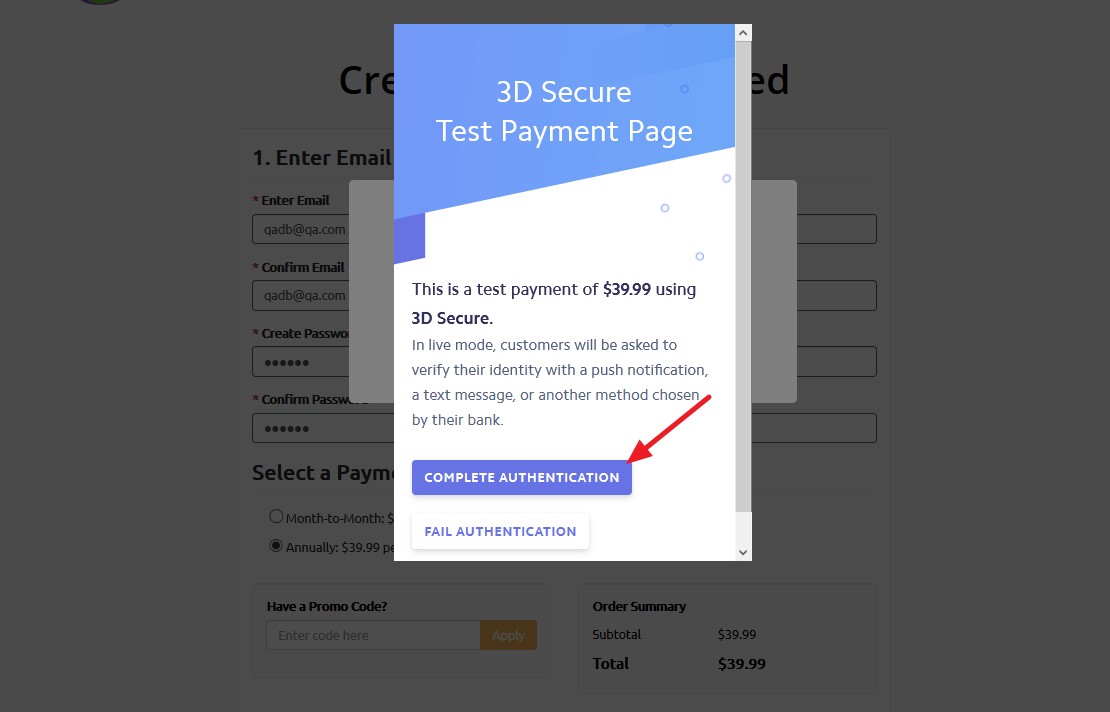
The same 3D Secure authentication pop-up may also appear when members complete other payment actions, such as purchasing Pay Per Post items, leads, digital products, or other paid features.
